
Learn · Article
Weekly Meeting with Your AI Team
Manage the desk on a clock — not only when something breaks.
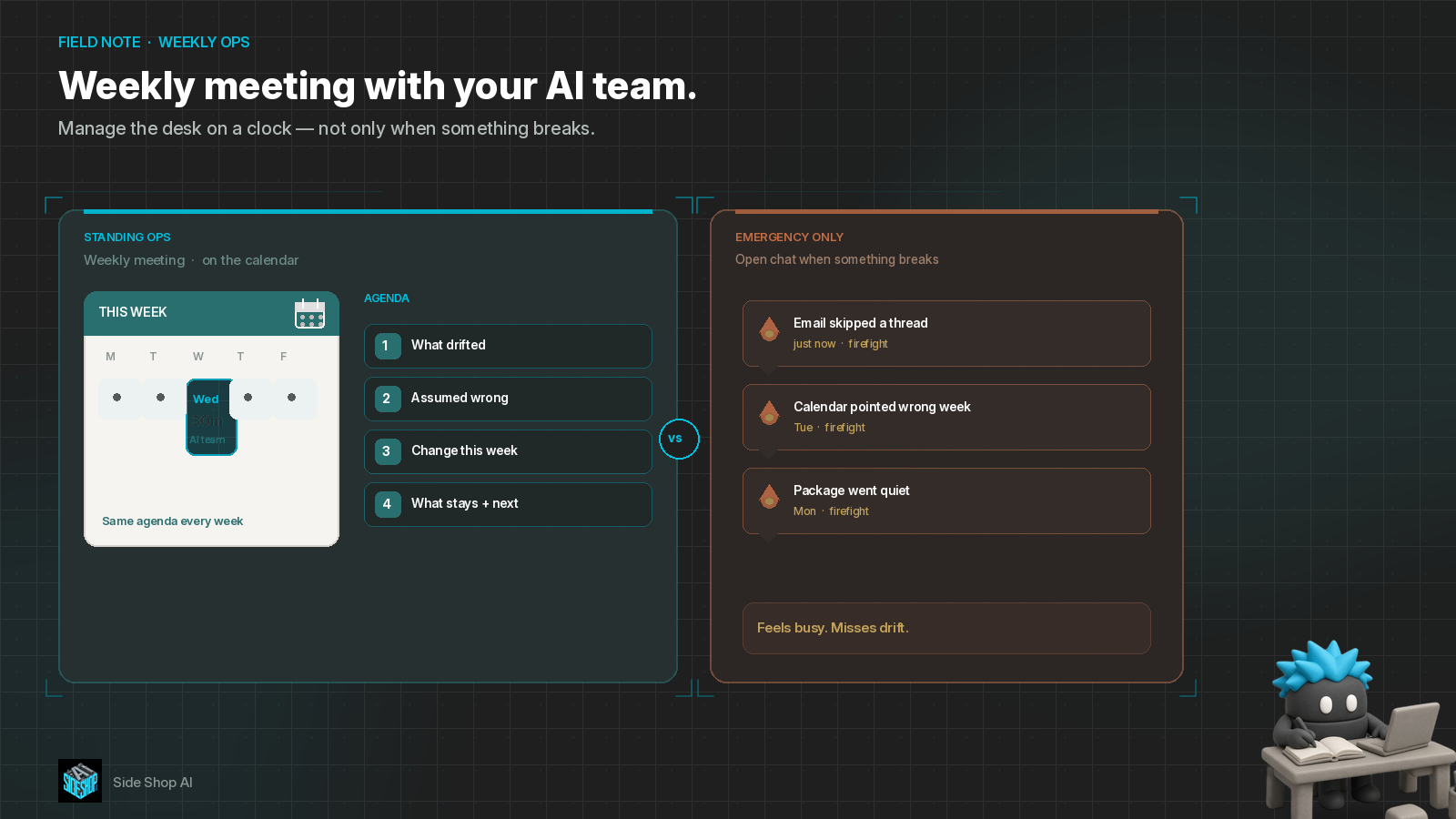
Most desks only open the bot chat when something is on fire.
The email helper skipped a thread. The calendar summary pointed at the wrong week. A package update went quiet. You jump in, correct it, close the tab — and call that “managing the team.”
It isn’t. That’s firefighting. Firefighting feels busy. It does not catch drift, fix bad assumptions, or improve how the system works.
A standing weekly with your AI team is normal ops. Put it on a calendar. Twenty to thirty minutes. Same agenda every week. Manage the desk on a clock — not only when something breaks.
Borrow the pattern from @Michael_Fenech_ (https://x.com/Michael_Fenech_/status/2105466658664108242): catch drift, fix bad assumptions, improve how the system works. The better you manage the team, the better the team gets.
Week-one setup already has a home — *How to Program a Bot — Start with the Job* (https://x.com/SideShopAi/status/2105340165673689197): name the job, give it a station, teach the steps, prove it on a normal week. This piece is what comes next. After the helpers are running, you still need a management clock — a weekly meeting that reviews the floor before the next fire starts.
Why emergency-only “meetings” won’t work
Emergency chats won’t improve the system unless you also review when nothing is burning.
If you only show up when output is wrong, you teach the desk one habit: wait for pain. Drift stays quiet. Assumptions stay unchallenged. Jobs, stations, and never-lines only change under stress — usually as a one-off prompt thrash that doesn’t stick.
A calendar meeting flips the order. You look while the week is still readable. You change one thing on purpose. You leave the rest alone.
Agenda item 1: what drifted
Helpers change quietly.
A source folder moved. A connector started reading a different inbox. A “never” line softened because last Tuesday’s exception felt helpful. Tone shifted. A package lane started guessing when tracking was blank.
In the weekly, ask out loud: what looked different this week than last week? Not “is the bot broken?” — “what quietly moved?”
Write the drift down. One line per helper is enough. You cannot fix what you never named.
Agenda item 2: what we assumed wrong
Every desk runs on assumptions: which folder is truth, which week the calendar means, what “actionable” counts as, when a blank source should park instead of invent.
The week will contradict some of those. That is not failure. That is the meeting’s job.
What did we think was true on Monday that Friday proved false? Fix the assumption on the job card — Purpose · Inputs · Outputs · Never — not with a random chat correction that evaporates by next Monday.
Same idea as *Don’t Trust the Charter. Trust the Failure Tests.* (https://x.com/SideShopAi/status/2103518668248215845): the written map has to match what the week actually showed. A weekly review is how you keep that map honest after go-live.
Agenda item 3: what we change this week
Improve the *system* — jobs, stations, never-lines, clocks — not a pile of one-off prompts.
Pick one change. Maybe Bates’s email station needs a clearer “actionable” rule. Maybe Calendar should stop summarizing weekends. Maybe Packages parks when tracking is empty instead of inventing a status.
Say the change out loud. Update the job card. Leave the other stations alone until next week.
Agenda item 4: what stays — and when we meet again
Not everything needs a tweak. Name what worked. Leave it on the clock.
Then confirm the next meeting is already on the calendar. That is the management habit: the review has a time, the same way a helper’s Routine has a time.
*How to Program a Bot — Start with the Job* (https://x.com/SideShopAi/status/2105340165673689197) gets the helpers standing. This piece is the sister beat after week-one — the *ongoing* management clock. Job clocks deliver work. The weekly meeting manages the desk that owns those jobs.
Worked example: Bates line vs fire-only chats
Picture a small desk with thin stations — Email, Calendar, Packages — the same Bates-style line from week-one setup.
Fire-only
Monday: email digest misses a vendor thread. You correct the chat and move on.
Wednesday: calendar helper summarizes next week instead of this one. Another chat.
Friday: packages invents a delivery day because tracking was blank. Third chat.
You spent the week babysitting. Nothing on the job cards changed. Next week the same holes return.
Standing weekly (20–30 minutes)
Same stations. Same human in the loop. Different habit.
1. Drift: Email skipped threads from one label. Calendar used the wrong week window. Packages guessed on blank tracking.
2. Assumptions wrong: “Actionable” was too wide. “This week” wasn’t pinned. Blank tracking was treated as “be helpful” instead of “park and ask.”
3. Change this week: tighten the actionable rule; lock the calendar window; Packages parks on blank tracking. Update the three job cards.
4. What stays: News lane looked fine. Leave it. Next meeting already on the calendar for the same slot.
Same bots. Different floor. One short meeting beats three emergency chats — and the system actually improves.
Where Grok Bot fits
Ongoing management is not “open a new chat and hope the desk improves itself.”
It is: keep named helpers and thin stations, open the job cards in the weekly, name drift and bad assumptions out loud, change one system rule at a time, and leave the review on a calendar the same way you leave trusted work on a Routine. Grok Bot allows you to decide what you need, and allows you to build it as you need it — including a standing ops meeting with the team you already set up.
Setup over spectacle. Meet on a clock. Improve on purpose.
One line to keep
Weekly meeting with your AI team.
Catch drift. Fix bad assumptions. Improve the system. Manage the desk on a clock — not only when something breaks.
Your side shop for AI that actually helps the business run — and the household, too.