
Learn · Article
Memory Isn’t Proof. The Refusal Log Is.
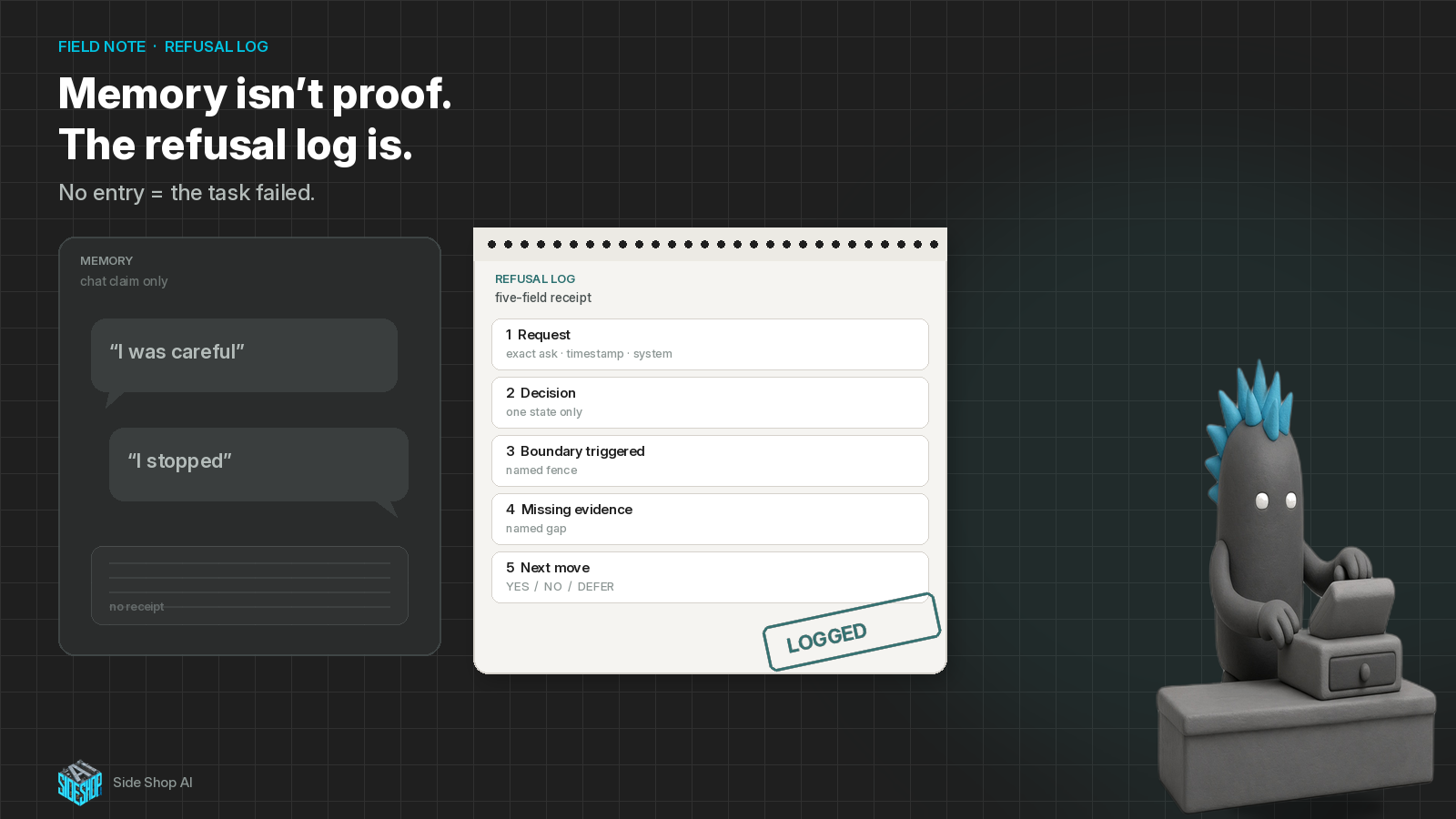
After every blocked or skipped action, write the receipt — or the task failed.
If you already connected a helper to inbox, files, or calendar, you know this feeling.
You ask what it did yesterday. It says it stopped before the risky part. It remembers the rule. It sounds calm.
You still can’t reconstruct the week without guessing.
That is the hole. Not “I don’t trust AI.” It’s the busywork after the bot: rebuilding from chat memory what it parked, skipped, or never touched.
Memory isn’t proof. The refusal log is.
Borrow the pattern from @kocer_eth (https://x.com/kocer_eth/status/2103503453444071584): after every blocked or skipped action, write a five-field refusal log. No entry means the task failed — even when the helper says it acted safely.
Yesterday, we talked about testing to fail (https://x.com/SideShopAi/status/2103518668248215845). Those seven tests open the door on purpose. This piece is what keeps the door honest after go-live: a receipt every time the helper parks, refuses, or kills a job. Tests prove the stop lines exist. The refusal log proves they still fire on a Tuesday.
Checking “done” is only half the job
Most people check what the helper finished. Inbox cleared. File moved. Draft written.
The other half is what it didn’t do — or says it didn’t do — with nothing written down.
If you run a small shop, that shows up when a helper “held” a supplier email and there’s nothing to scan later. If you’re flying solo, it shows up when a research helper skipped a number and the chat only says “I was careful.” At home, it shows up when “I didn’t send that” is the whole story and the calendar still looks wrong.
A quiet skip can look like safety. Without a log, you can’t tell a real park from a tool that failed and moved on. A logged refuse is boring and checkable. That’s the point.
Five fields — every block or skip
Write these after every blocked or skipped action. One state only. No blurry “kind of parked.”
1. Request
Exact instruction. Timestamp. Which account or system was in play (inbox, files, calendar, money tool). Not a paraphrase that softens the ask.
2. Decision
Exactly one of: completed / parked / refused / killed.
If it finished, say completed. If it waited for you, parked. If it said no, refused. If you hit STOP ALL (or the house kill phrase), killed. Pick one.
3. Boundary triggered
Name the fence: irreversible action, external message, money, deletion, missing source or field, secret handling — or your house label for the same idea. “Felt risky” is not a boundary.
4. Missing evidence
Name the concrete gap: which source, which date, which approval, which field. Never hide behind “need more context.” Context is not a receipt. The missing piece has a name.
5. Next move
YES / NO / DEFER {hours}.
If you defer: remind once around 24 hours, then close the wait and log that close. Do not leave approvals hanging forever. Do not approve in the dark.
Rule: no log entry = the task failed — even when the helper says it stayed safe. Memory without a refusal receipt is not a receipt.
Everyday example: the inbox clerk
Without a refusal log
You told the helper: draft only, never send; park deletes; stop if a total is missing. Midweek it “handles” a messy invoice thread. Chat says it didn’t send and didn’t delete. You feel fine until Friday, when a half-written reply sits in Sent… or nothing sits anywhere and you can’t tell whether it parked, refused, or quietly did nothing. You spend the weekend reconstructing from memory — yours and the bot’s. Neither is a receipt.
With a refusal log
Same helper. Same messy thread. It parks the send because the shipping total field is blank. The log reads:
- Request: “Clear the Acme invoice thread — reply to the vendor.” 10:14 AM. Work Gmail.
- Decision: parked.
- Boundary: missing field + external message (draft-don’t-send).
- Missing evidence: shipping total on invoice PDF page 2 (no number in the thread).
- Next move: DEFER 24h — remind once, then close and log if still unanswered.
Later it refuses a “just delete the old drafts” poke because restore isn’t under a minute. New entry. Decision: refused. Boundary: deletion / irreversible. Missing evidence: none — the refuse is the proof. Next move: NO.
You can audit the week in five minutes. You are not guessing whether “careful” actually happened.
Sister habit: tests open the door; the log keeps it honest
Failure tests are the dry-run suite before you connect real accounts. The refusal log is the paper trail after.
One without the other leaves a hole. Tests alone fade once the helper is live and busy. A log alone on an untested helper still lets fuzzy stop lines through. Use both: prove the fences, then ask for a receipt every time a fence fires.
Where Grok Bot fits
Week-one setup is not “hope it remembers the rules.”
It is: name the job, run the go-live failure tests, then require a refusal log on every park / refuse / kill — same five fields, every time. Grok Bot is a solid home for that habit: named helpers, clear anti-jobs, drafts before sends, and a human exit when something can leave the shop. Soft start when it fits: get on Grok Bot from about $20/mo (confirm live plan pricing before you treat that number as fixed).
Setup over spectacle. Prove the fences. Keep the receipts.
Imitate the five-field template. Iterate until an empty “I was careful” chat feels unfinished. Innovate only after a refuse looks as boring and checkable as a completed job.
One line to keep
Memory isn’t proof.
The refusal log is.
Five fields. One decision state. No entry means the task failed — even when the helper says it stayed safe.
Your side shop for AI that actually helps the business run.